
What Is a Lightning Connector? Uses, Cables and USB-C Differences
A Lightning connector is a small charging and data connector developed by Apple. It was widely used on iPhones, iPads, AirPods and other Apple accessories before the company began moving its newer products to the more universal USB-C standard.
Most people recognise Lightning as the narrow plug that connects to the charging port on an iPhone 14 or an older compatible model. The connector can be inserted in either direction, making it more convenient than older plugs that had to be positioned a particular way.
A Lightning cable can do more than charge a battery. Depending on the device and accessory, it may transfer photographs, synchronise data, connect wired headphones, provide audio output or link an iPhone to a display through a compatible adapter.
Lightning is now considered a legacy Apple connection rather than the main connector on the latest iPhones. However, millions of older devices and accessories still use it, which means Lightning cables remain relevant for many households in 2026.
What Is a Lightning Connector in Simple Terms?
A Lightning connector is Apple’s compact plug for connecting certain devices to power adapters, computers and accessories. One end of the cable fits into the Apple device, while the other end may use USB-A, USB-C or another connection.
The word “Lightning” normally refers to the small Apple-designed end of the cable rather than the complete charging system. A USB-C to Lightning cable, for example, has a USB-C plug on one end and a Lightning plug on the other.
Inside the connector are contacts that carry electrical power and digital information. These contacts allow the device to recognise a compatible accessory, begin charging or exchange data with another connected device.
Apple introduced Lightning with the iPhone 5 in September 2012, describing it as smaller, smarter and more durable than the previous connector. It replaced the much wider 30-pin dock connector used on earlier Apple products.
What Does a Lightning Connector Look Like?
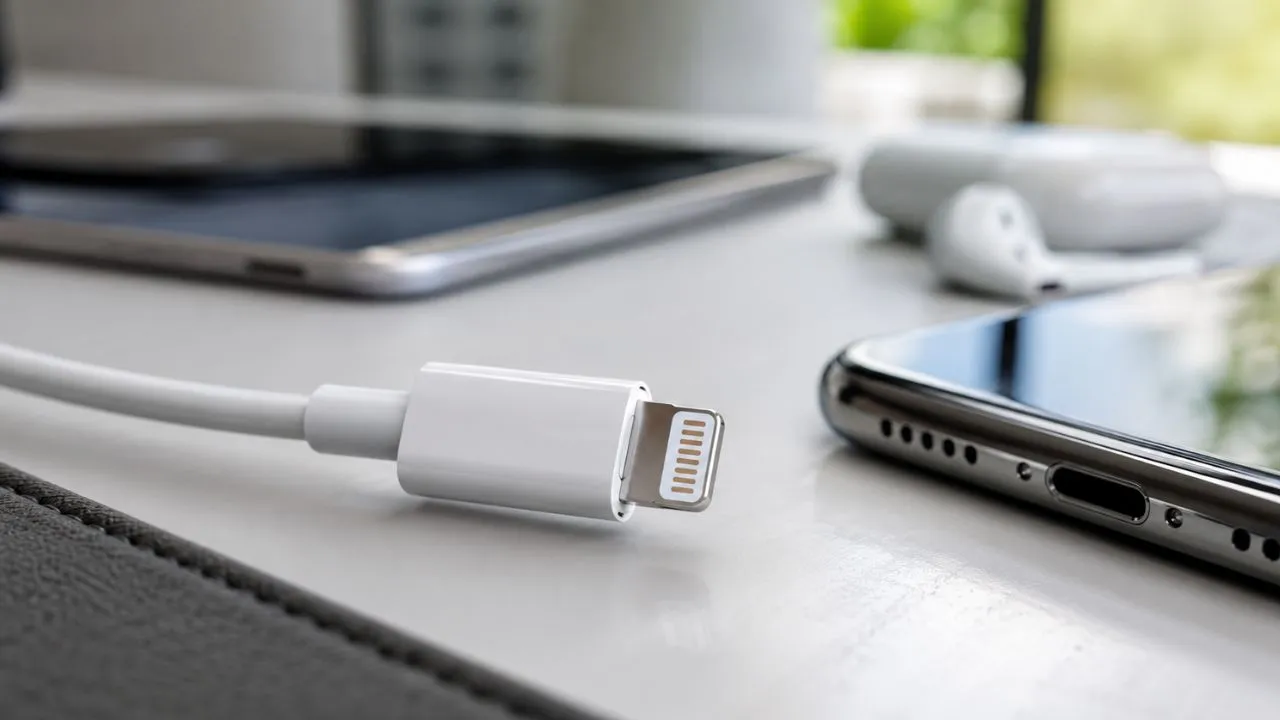
The Lightning plug is small, thin and flat, with exposed metal contacts on both sides. Its symmetrical shape allows you to insert it into a compatible port without checking which side is facing upwards.
This reversible design was one of Lightning’s most noticeable improvements over many older USB connectors. Users could connect their phones more quickly, particularly in low light or when reaching towards a charger beside the bed.
The Lightning port on an iPhone is normally located along the bottom edge of the device. It sits between the phone’s speaker and microphone openings and may collect dust, pocket lint or other debris over time.
Do not confuse the Lightning connector with a USB-C plug. USB-C is wider, has a hollow centre and is used on iPhone 15 and later models, while Lightning is a solid, narrow connector found on older compatible Apple products.
Why Did Apple Create the Lightning Connector?
Before Lightning, many Apple mobile devices used a large 30-pin dock connector. That connection occupied more internal and external space, making it less suitable for the thinner phones and portable devices Apple wanted to develop.
Lightning provided a much smaller alternative that could handle charging, data and accessories. Its compact design gave Apple more flexibility when designing slimmer iPhones, iPods and iPads.
The reversible plug also improved everyday convenience. Older connectors could be damaged when users attempted to insert them incorrectly, while Lightning could be connected with either side facing upwards.
Apple launched Lightning across several products in 2012, including the iPhone 5, iPod touch and iPod nano. The company also offered an adapter to help users connect some existing 30-pin accessories to the new port.
How Does a Lightning Connector Work?
When you insert a Lightning cable into a compatible device, the contacts inside the plug connect with contacts in the device’s charging port. The device then determines whether the connection is intended for charging, data transfer or an accessory.
A cable connected to a power adapter delivers electricity to the device’s battery. The phone or accessory manages how much power it accepts according to its charging hardware, battery condition, temperature and the capabilities of the adapter.
When the cable is attached to a computer, it may transfer photographs, synchronise files, create a backup or provide a wired Personal Hotspot connection. The available features depend on the connected device and its software settings.
Some accessories also contain identification components that communicate with the Apple device. This helps the device determine whether the accessory is compatible and whether functions such as audio, data or charging should be enabled.
Which iPhones Have a Lightning Connector?
The Lightning connector appeared on iPhones beginning with the iPhone 5. It remained the standard wired connection across multiple generations, including the iPhone 6, iPhone 7, iPhone 8, iPhone X and iPhone 11 ranges.
Later Lightning-based models include the iPhone 12 and iPhone 13 families. The iPhone SE models released during the Lightning era also use this connector for charging, computer connections and supported accessories.
The iPhone 14, iPhone 14 Plus, iPhone 14 Pro and iPhone 14 Pro Max were the final main iPhone generation to use Lightning. Their technical specifications identify a Lightning port along the bottom edge of each device.
Apple changed the iPhone range to USB-C with the iPhone 15 series in 2023. Current models such as the iPhone 16 and iPhone 17 families also use USB-C rather than Lightning.
Which Other Apple Devices Use Lightning?
Several older iPad models use Lightning, including certain standard iPads, iPad mini models and earlier iPad Air devices. Newer iPads have moved to USB-C, so the connector depends on the exact model and release year.
Many AirPods charging cases were also produced with Lightning ports. Apple later introduced USB-C versions of certain AirPods products, but Lightning cases remain common among people who purchased earlier generations.
Other Lightning accessories include selected Siri Remotes, older Apple keyboards, Magic Mouse models and Magic Trackpads. A USB-C to Lightning cable can charge several of these accessories when connected to an appropriate USB-C port or power adapter.
Because products often look similar between generations, inspect the charging port before buying a replacement cable. Apple confirms that its USB-C to Lightning cable can charge and sync compatible AirPods, iPhones, iPads, iPods, Siri Remotes and selected accessories.
What Is a Lightning Connector Used For?
Charging is the most common use of a Lightning connector. You can connect a compatible iPhone or accessory to a wall adapter, computer, power bank or another suitable power source using the correct cable.
Lightning also supports data synchronisation. When connected to a Mac or Windows computer, a compatible iPhone can transfer photographs, create backups and exchange other supported information through Apple software.
The connector can carry audio as well. Lightning EarPods and Lightning-to-headphone adapters allow supported iPhones without a traditional 3.5mm headphone port to work with wired earphones and audio equipment.
Special adapters can provide video output, camera connections or access to other accessories. For example, Apple’s iPhone 14 specifications support video mirroring at up to 1080p through compatible Lightning Digital AV and VGA adapters.
USB-A to Lightning vs USB-C to Lightning
A USB-A to Lightning cable has the older rectangular USB plug on one end. It works with traditional USB-A wall adapters, computers, car ports and power banks that do not provide a USB-C connection.
A USB-C to Lightning cable uses the newer, smaller USB-C plug on the power-source end. It can connect to compatible modern adapters, laptops and power banks while still fitting a Lightning-based iPhone or accessory.
Both cables may charge and synchronise compatible Apple devices, but they do not always provide the same charging speed. USB-C to Lightning is generally the better option when using a supported fast-charging adapter and compatible iPhone.
You do not necessarily need to replace a working USB-A cable for basic overnight charging. Apple confirms that compatible Lightning iPhones can work with both existing USB-A to Lightning cables and newer USB-C to Lightning cables.
Does Lightning Support Fast Charging?
Lightning can support fast charging on compatible iPhone models when it is used with a USB-C to Lightning cable and a suitable USB-C power adapter. The connector itself is only one part of the complete charging setup.
A higher-wattage adapter does not force unlimited power into the phone. The iPhone communicates with the charger and draws an amount that its charging system can safely manage.
Charging is normally quickest when the battery level is low. The phone gradually slows charging as it approaches a high percentage to control heat and help protect the battery over time.
For example, Apple rated the iPhone 14 as capable of reaching approximately 50% charge in around 30 minutes with a 20W or higher adapter under test conditions. Real results depend on temperature, usage, cable quality and battery condition.
How Fast Is Lightning Data Transfer?
Most Lightning-based iPhones transfer data at USB 2-class speeds. The maximum theoretical rate commonly associated with this connection is 480 megabits per second, although actual performance may be slower.
This speed is usually adequate for synchronising music, transferring a small group of photographs or creating occasional backups. However, moving large video libraries through a Lightning cable can take considerably longer.
USB-C does not automatically guarantee faster data because some USB-C devices also operate at USB 2 speeds. However, selected newer Pro iPhones support USB 3 speeds of up to 10 gigabits per second when used with a suitable cable.
This difference is especially useful for professional video creators and photographers who regularly transfer large files. Apple’s USB-C to Lightning adapter documentation also identifies data transfer speeds of up to 480Mbps when Lightning is involved.
Is Lightning the Same as USB-C?
No, Lightning and USB-C are different connectors. Lightning was developed and controlled by Apple, while USB-C is a widely adopted connection used across phones, computers, tablets, cameras and many other devices.
The two plugs have different physical shapes and cannot be inserted directly into each other’s ports. An iPhone with Lightning requires a Lightning cable, while an iPhone with USB-C needs a USB-C cable.
USB-C can support a wider range of power, data and display capabilities, although the performance depends on the device and cable. Two cables that look like USB-C may still offer different charging wattages or transfer speeds.
Lightning’s main advantage was its compact, reversible design when it launched. USB-C later provided similar reversible convenience while becoming a more universal standard across products from Apple and other manufacturers.
Lightning vs USB-C: Which Is Better?
USB-C is generally more convenient for people who own several modern devices. The same type of cable may charge a recent iPhone, iPad, Android phone, headphones, camera, laptop or portable gaming device.
USB-C can also support much faster data transfer than Lightning when both the device and cable include a faster USB standard. This is useful for transferring high-resolution video, connecting displays and using external storage.
Lightning still works well for ordinary charging and basic synchronisation on compatible Apple products. People who already own several Lightning cables and accessories may not gain an immediate benefit from replacing a working device solely because of its port.
For most new purchases, USB-C offers better long-term convenience. Apple introduced USB-C across the iPhone 15 range, and its current iPhone models use USB-C for charging and wired connections.
Why Did Apple Replace Lightning With USB-C?
Using USB-C makes it easier for customers to carry fewer cables. A person may now be able to charge a recent iPhone, iPad and MacBook with the same type of connection instead of keeping a separate Lightning cable.
USB-C also provides broader support for modern accessories. Depending on the iPhone model, it may connect directly to external storage, displays, microphones, cameras and other devices without a Lightning adapter.
Selected Pro models benefit from faster USB 3 data transfer. This can make a meaningful difference when moving ProRes videos and other large professional files from the phone to another device.
Apple described USB-C on the iPhone 15 as a widely accepted standard for charging and data transfer. The change allowed one cable type to work across newer iPhones, Macs, iPads and compatible AirPods products.
Is the Lightning Connector Still Used in 2026?
Lightning is no longer the connector used by Apple’s latest iPhone range. The company currently promotes USB-C models, including the iPhone 16 and iPhone 17 families, through its UK store.
However, Lightning has not become useless. Many people continue using iPhone 14 and earlier models, older AirPods cases, keyboards, mice, trackpads and other accessories that require it.
Apple also continues to publish support information for USB-C to Lightning cables and adapters. This shows that the company still recognises the need to connect and charge legacy Lightning equipment.
Buying a replacement Lightning cable can therefore be sensible when your existing devices still work well. It is less practical to invest heavily in a large new collection of Lightning-only accessories when you expect to upgrade to USB-C products soon.
What Is an MFi-Certified Lightning Cable?
MFi originally stands for Apple’s “Made for iPhone,” “Made for iPad” and related accessory-certification programme. Certified accessories are designed to meet Apple’s compatibility and performance requirements.
A third-party Lightning cable with appropriate certification should communicate correctly with supported Apple devices. This can reduce problems involving charging, data transfer, excessive heat or repeated accessory warnings.
Certification does not mean every cable has the same durability. Length, materials, connector reinforcement, warranty and maximum charging capability can still vary between brands and individual products.
Apple recommends checking for the relevant “Made for” label when purchasing compatible third-party accessories. It warns that counterfeit or uncertified Lightning products may become hot, break easily, fail to charge or potentially damage the connected device.
Why Does “Accessory May Not Be Supported” Appear?
This warning may appear when an iPhone cannot communicate correctly with a connected Lightning cable or accessory. The product may be damaged, incompatible, uncertified or designed for a different Apple device.
A dirty or damaged charging port can also trigger the message. Pocket lint may prevent the plug from making a complete connection, even when the cable looks securely inserted from the outside.
Disconnect the accessory, unlock the iPhone and reconnect it firmly. You can also update iOS, test another known working cable and inspect both ends for visible damage or dirt.
When the warning appears with several genuine accessories, the Lightning port may need professional inspection. Apple lists damaged products, unsupported accessories and dirty or damaged ports among the common causes of this alert.
How to Clean a Lightning Port Safely
Turn off the iPhone and unplug all cables before inspecting the Lightning port. Use a bright light to check whether visible lint or debris is preventing the connector from reaching the bottom.
Do not pour water, alcohol or household cleaning products into the port. Avoid metal pins, knives and other sharp objects that could scratch the contacts or create an electrical problem.
Compressed air can force debris further inside or affect delicate components, so it should not be treated as the default cleaning method. Aggressive scraping may also compact pocket lint instead of removing it.
When you cannot remove the obstruction safely, take the device to Apple or a qualified repair provider. Apple advises cleaning the phone with cables disconnected, avoiding moisture in openings and treating dirt around port openings very gently.
What to Do When a Lightning Connector Is Wet
Do not connect a Lightning cable when you believe liquid is present in the iPhone port. Charging a wet connector can cause corrosion, permanent damage or future connection problems.
Disconnect the cable and place the phone in a dry area with airflow. Allow it to dry naturally before attempting to charge it again, even when the outside of the device already appears dry.
Do not use a hairdryer, heater or compressed air to speed up drying. You should also avoid inserting cotton buds, paper or other objects into the connector.
Placing the phone in rice is not recommended because small particles can enter and damage the port. Apple’s charging guidance says not to plug a cable into an iPhone when liquid may be present in its charging connection.
Why Is a Lightning Cable Not Charging?
First, check the complete charging setup. The problem may come from the cable, Lightning port, power adapter, wall socket or battery rather than from the connector alone.
Inspect the cable for splits, discolouration, bent contacts or a loose connector. Try another certified cable and compatible adapter to identify which part of the setup is causing the failure.
Look inside the iPhone port for visible debris and make sure the plug fits firmly. Restarting the phone and installing the latest supported version of iOS may also resolve certain software or accessory-recognition problems.
When the phone still does not charge with several known working accessories, it may require service. Apple recommends checking the power source, removing port debris, reconnecting the cable firmly and testing the charging equipment.
How to Choose the Right Lightning Cable
Begin by checking the port on your power adapter or computer. Choose USB-A to Lightning for an older rectangular USB port or USB-C to Lightning for a newer USB-C connection.
For fast charging, select a USB-C to Lightning cable and a suitable USB-C power adapter supported by your iPhone. The cable should clearly state that it is intended for your device and charging requirements.
Look for Apple branding or recognised MFi certification when purchasing from another manufacturer. Very cheap unbranded cables may save money initially but can be less reliable or create compatibility and safety concerns.
Also consider cable length, connector reinforcement and warranty. A longer cable may be convenient beside a bed, while a shorter and more durable design may be better for a car, desk or portable power bank.
Advantages of a Lightning Connector
Lightning is small and reversible, so it is easy to insert without checking its orientation. This simple design helped make everyday charging more convenient than with several older connectors.
The plug also creates a firm physical connection with compatible devices. A properly fitting cable is less likely to disconnect during ordinary use than a loose or damaged charging connection.
A large range of Lightning accessories was developed during its years as the main iPhone port. Users can still find cables, headphones, docks, microphones, adapters and car accessories for supported models.
Lightning also supports charging, synchronisation, audio and several adapter-based functions through one compact connection. These abilities helped it remain Apple’s main mobile connector for more than a decade.
Disadvantages of a Lightning Connector
Lightning is mainly associated with Apple products, so it is less universal than USB-C. Someone travelling with several modern devices may need to carry an extra Lightning cable solely for an older iPhone or accessory.
Its typical data-transfer performance is also slower than the faster USB standards supported by selected USB-C devices. This becomes noticeable when transferring large photograph libraries or professional video files.
The connector requires specialised accessories and licensing for certified third-party products. Customers must therefore pay attention to compatibility instead of assuming that every similar-looking cable will work correctly.
Lightning also has a less future-proof position because Apple’s current iPhones use USB-C. People buying new accessories should consider whether those products will remain useful after their next phone or tablet upgrade.
Conclusion
A Lightning connector is Apple’s compact, reversible connection for charging, synchronising and attaching accessories to many older iPhones, iPads, AirPods cases and other products. It replaced Apple’s large 30-pin connector in 2012.
The connector can carry power, data and audio, while compatible adapters can provide additional functions such as video output. It may be paired with either USB-A or USB-C on the other end of a cable.
Lightning is different from USB-C and cannot be connected to a USB-C port without the correct cable or adapter. USB-C offers broader compatibility and can support faster transfers on suitable devices.
Although Apple’s newest iPhones use USB-C, Lightning remains useful for iPhone 14 and older models as well as many existing accessories. Choose certified cables, keep the port clean and never connect a charger while the port is wet.
Frequently Asked Questions
What is a Lightning connector used for?
A Lightning connector charges compatible Apple devices and transfers data to or from a computer. It can also connect headphones, displays and other equipment through supported accessories or adapters.
Is a Lightning connector the same as USB-C?
No. Lightning is Apple’s older proprietary connector, while USB-C is a widely used industry standard. The plugs have different shapes and are not directly interchangeable.
Which iPhone was the last to use Lightning?
The iPhone 14 family was the final main iPhone generation to use a Lightning port. Apple introduced USB-C across the iPhone 15 range and continued using it on later models.
Can a Lightning cable support fast charging?
Yes, compatible iPhones can fast-charge through a USB-C to Lightning cable and a suitable USB-C power adapter. Charging performance depends on the iPhone, adapter, cable and battery conditions.
Do I still need a Lightning cable in 2026?
You need one when you own an iPhone 14 or older compatible iPhone, a Lightning AirPods case or another Lightning accessory. Newer iPhones use USB-C instead.