
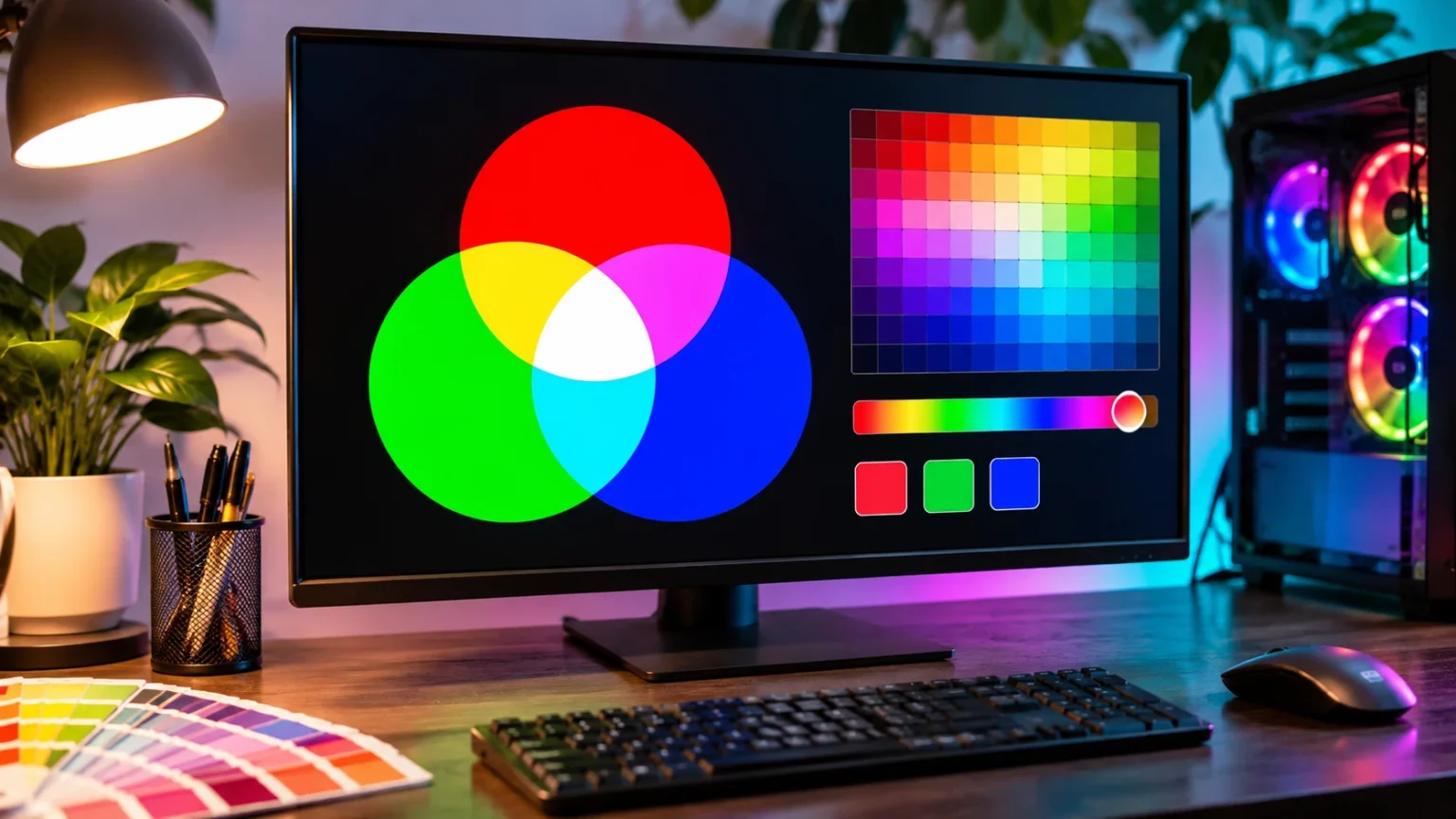

RGB stands for Red, Green, and Blue, the three colors of light used to create millions of colors on digital screens. From smartphones and televisions to websites and computer monitors, RGB plays an important role in how we see digital images. Understanding what is RGB helps you learn how colors work, how color codes are written, and why different screens display different shades. This guide explains RGB colors, codes, and practical applications in simple language.
What Is RGB and What Does It Stand For?
RGB stands for Red, Green, and Blue. It is a color model that combines different amounts of these three light colors to create many other colors. Digital devices use this system to display photographs, graphics, videos, and website designs. By adjusting the intensity of red, green, and blue light, screens can produce a wide variety of visible colors.
The RGB color model is based on the principle of additive color mixing. This means colors become brighter as more light is added together. When red, green, and blue light are combined at full intensity, they produce white light. When all three colors have zero intensity, the result is black because no light is being emitted.
RGB is commonly used in computers, televisions, smartphones, tablets, and digital cameras. It provides a standardized way to describe colors using numerical values. Designers and developers rely on these values to select and reproduce colors in digital projects. Understanding the RGB meaning is an important first step toward learning digital design and color technology.
How Does the RGB Color Model Work?
The RGB color model works by combining red, green, and blue light at different intensity levels. Each primary color contributes to the final color displayed on a screen. Increasing or decreasing one component changes the overall appearance. For example, combining strong red light with strong green light creates yellow in an additive color system.
In standard 8-bit RGB color representation, each color channel has a value between 0 and 255. A value of 0 means that particular color contributes no light, while 255 represents its maximum intensity. These values allow precise control over color combinations. Together, the three channels can represent more than 16 million possible color combinations.
Digital screens contain tiny elements called pixels that use red, green, and blue subpixels to produce colors. These subpixels emit or control different amounts of light depending on the image being displayed. The human eye blends their light into a single perceived color. This process allows screens to display detailed images with smooth transitions between different shades.
What Are the Primary Colors in RGB?
The three primary colors in the RGB system are red, green, and blue. They are known as additive primary colors because they can combine to create many other visible colors of light. Each primary color has a specific role in digital color reproduction. Mixing them at different intensities produces a broad range of shades.
Red is represented by the RGB code (255, 0, 0), meaning the red channel is at maximum intensity. Green uses (0, 255, 0), while blue uses (0, 0, 255). These values represent pure primary colors in the standard RGB system. By adjusting their proportions, designers can create everything from soft pastels to bright digital colors.
Combining two primary RGB colors at full intensity creates secondary colors. Red and green produce yellow, green and blue produce cyan, and red and blue produce magenta. Combining all three creates white light when their intensities are equal and at maximum. These relationships form the foundation of additive color theory used in digital technology.
What Are RGB Color Codes?
RGB color codes are numerical combinations that describe how much red, green, and blue light a digital color contains. Each code includes three values arranged in the order red, green, and blue. For example, RGB (255, 0, 0) represents bright red. These numbers help computers interpret and display colors with consistent digital instructions.
The standard RGB color code format uses values from 0 to 255 for each channel. Changing any number creates a different color combination. For example, RGB (255, 165, 0) produces orange, while RGB (128, 0, 128) represents purple. Designers can use these codes to choose specific shades for websites, applications, and graphics.
RGB values are especially useful when maintaining consistent colors across digital projects. Instead of describing a shade as light blue or dark green, you can provide exact numerical values. This makes communication easier between designers and developers. However, the final appearance can still vary depending on screen calibration, brightness, and color settings.
Common RGB Color Codes and Examples
Several RGB color codes are frequently used in web design, graphic design, and digital applications. Learning these examples makes it easier to understand how the three color channels interact. You can also use them as starting points when experimenting with different shades. Each combination represents a particular balance of red, green, and blue.
Here are some common RGB colors and their corresponding values:
| Color | RGB Code | Hex Code |
|---|---|---|
| Red | (255, 0, 0) | #FF0000 |
| Green | (0, 255, 0) | #00FF00 |
| Blue | (0, 0, 255) | #0000FF |
| White | (255, 255, 255) | #FFFFFF |
| Black | (0, 0, 0) | #000000 |
| Yellow | (255, 255, 0) | #FFFF00 |
| Cyan | (0, 255, 255) | #00FFFF |
| Magenta | (255, 0, 255) | #FF00FF |
| Orange | (255, 165, 0) | #FFA500 |
| Purple | (128, 0, 128) | #800080 |
| Gray | (128, 128, 128) | #808080 |
| Pink | (255, 192, 203) | #FFC0CB |
These examples demonstrate how changing RGB values produces different colors. Equal values in all three channels create neutral shades, such as black, gray, and white. Unequal values introduce different color characteristics. Experimenting with these combinations is a practical way to develop a better understanding of digital color mixing.
How RGB Creates Millions of Colors
The RGB system can represent millions of colors because each channel supports many intensity levels. In standard 8-bit RGB, red, green, and blue each have 256 possible values. Multiplying these possibilities produces 16,777,216 combinations. This large number allows digital devices to represent detailed photographs, illustrations, and graphics with a wide range of color variations.
Different combinations create subtle differences that may be difficult to notice individually. For example, RGB (255, 0, 0) produces pure red, while RGB (240, 20, 20) produces a slightly different red shade. Small numerical adjustments can change brightness and color balance. This flexibility is valuable when creating gradients, shadows, and realistic digital images.
Although RGB can represent millions of combinations, not every combination appears equally different to human eyes. The visible result also depends on the screen’s capabilities and color calibration. Some displays reproduce a wider range of colors than others. Therefore, the number of available color codes does not guarantee that every screen will display them identically.
What Is the Difference Between RGB and HEX Colors?
RGB and HEX are two common ways to represent digital colors. RGB uses three decimal numbers to describe red, green, and blue intensities. HEX uses hexadecimal notation, which includes numbers and letters. Both formats can represent the same color values in standard web design, but they present the information differently.
For example, pure red is written as RGB (255, 0, 0) or #FF0000. White is represented by RGB (255, 255, 255) or #FFFFFF. The six characters in a standard HEX color code are divided into three pairs. Each pair represents the intensity of red, green, or blue using hexadecimal values from 00 to FF.
Neither format is automatically better for every digital design task. RGB can feel easier when adjusting individual channels numerically, while HEX provides a compact way to record colors. Both work well in modern web development and design software. Choosing between them usually depends on personal preference, project requirements, and the tools being used.
RGB vs CMYK: What Is the Difference?
RGB and CMYK are two color models designed for different purposes. RGB uses red, green, and blue light to produce digital colors, while CMYK uses cyan, magenta, yellow, and black inks for printing. RGB is an additive model, whereas CMYK is primarily subtractive. Understanding this difference helps explain why printed colors sometimes look different from screen colors.
Digital screens produce colors by emitting or controlling light, making RGB suitable for electronic displays. Printing works differently because ink absorbs certain wavelengths of light reflected from paper. Combining printing inks produces a wide range of colors, but their results depend on materials and printing conditions. This difference affects how colors appear when digital artwork becomes a printed product.
Designers often create screen-based projects in RGB and prepare print files according to printer requirements. However, simply converting colors from RGB to CMYK does not guarantee an identical appearance. Some bright screen colors cannot be reproduced accurately with standard printing inks. Checking proofs and using appropriate color profiles helps reduce unexpected differences in the final printed result.
Where Is RGB Used in Everyday Technology?
RGB is widely used in everyday technology, especially devices with digital displays. Smartphones, laptops, televisions, tablets, and computer monitors rely on color reproduction systems built around red, green, and blue. These devices combine light to create the images people see. From watching movies to browsing websites, RGB technology supports familiar digital experiences.
Digital cameras also work with RGB information when capturing and processing images. Most camera sensors use color filters that help measure red, green, and blue light components. Image-processing software combines this information to create full-color photographs. The resulting files can then be displayed, edited, and shared across different digital platforms.
RGB lighting is another familiar application found in gaming setups, keyboards, computer cases, and decorative lighting systems. These products combine colored light sources to create different effects. Users can select colors, adjust brightness, or choose changing light patterns. Although the technology is different from a traditional screen, the underlying additive color principle remains similar.
Why Is RGB Important in Web Design?
RGB plays an essential role in web design because websites are viewed on digital screens. Designers use RGB-based color values to define backgrounds, text, buttons, icons, and other visual elements. Consistent color choices help create recognizable website identities. They also improve the visual organization of content when used thoughtfully throughout a page.
CSS, the styling language used for websites, supports RGB color values directly. For example, the code rgb(0, 0, 255) creates blue. Developers can change individual values to adjust a color without selecting a completely new shade. This makes RGB useful when experimenting with visual styles or building reusable design systems.
Web designers should also consider accessibility when selecting RGB colors. Text needs sufficient contrast against its background to remain readable for different users. Bright colors are not always effective when paired with similar backgrounds. Using contrast-checking tools and testing designs across devices helps create websites that are both visually appealing and easier to navigate.
How to Use RGB Colors in CSS and HTML
RGB colors can be added to websites using CSS color properties. Developers commonly use them for text, backgrounds, borders, and decorative elements. The basic syntax is rgb(red, green, blue), with each channel typically written as a value between 0 and 255. This format gives developers direct control over the colors displayed on a webpage.
For example, a paragraph can use color: rgb(255, 0, 0); to display red text. A background can use background-color: rgb(240, 240, 240); to create a light gray appearance. These values can be changed easily during website development. CSS also supports hexadecimal colors and other formats, allowing developers to work with different color notation systems.
Modern CSS supports transparency through an alpha value, commonly written using rgba() or the newer rgb() syntax with a slash. For example, rgb(255 0 0 / 50%) represents red with 50 percent opacity. Transparency allows background content to remain partly visible through an element. This feature is useful for overlays, interface effects, and layered visual designs.
How to Choose the Right RGB Color Combinations
Choosing effective RGB color combinations begins with understanding the purpose of your design. A business website may benefit from a restrained color palette, while an entertainment application might use brighter colors. Consider the emotions and associations different colors may communicate. However, cultural context and personal preferences can influence how people interpret colors.
Start with a primary color and select a few supporting shades that work together. Complementary and analogous color schemes can provide useful starting points when building a palette. You can also adjust RGB values to create lighter or darker variations. Keeping the number of major colors manageable often produces a more consistent and organized appearance.
Color contrast is especially important when designing text, buttons, and navigation elements. Two attractive colors may not provide enough separation when placed together. Test your combinations on different screens and under varying brightness conditions. A successful digital color palette should support readability, usability, and the overall visual identity of the project.
What Is RGB Color Depth?
RGB color depth describes how much information is available to represent colors in a digital image. Standard 24-bit RGB uses eight bits for each of the three color channels. This allows 256 intensity levels per channel and approximately 16.7 million combinations. Higher color depths can represent more precise differences between individual channel values.
Some image formats and professional workflows support 16 bits per channel, often called 48-bit RGB. This provides far more numerical precision than standard 8-bit color. The additional precision is especially useful during image editing and color correction. It can help reduce visible banding when making substantial adjustments to gradients and tonal values.
Higher color depth does not automatically mean that a display can show every available shade. The screen’s hardware, color gamut, and software settings also influence the final result. Professional workflows often use higher precision to preserve image information during editing. Understanding RGB color depth helps explain why digital images may behave differently across formats and devices.
Why RGB Colors Look Different on Different Screens
The same RGB color code can appear slightly different on separate screens. This happens because displays use different panels, brightness levels, color gamuts, and calibration settings. A color that appears vivid on one monitor may look softer on another. Environmental lighting can also influence how people perceive colors while viewing digital content.
Color profiles help devices interpret RGB values more consistently. The sRGB color space is widely used for websites and general digital content. Other spaces, such as Display P3 and Adobe RGB, can represent different ranges of colors. Without appropriate color management, the same numerical values may produce noticeably different visual results.
Designers can reduce color inconsistencies by working with suitable profiles and testing their content on multiple devices. Calibrated monitors are particularly helpful for professional photography and graphic design. Export settings also matter when preparing images for websites or online platforms. Although perfect consistency is difficult, careful color management can produce more predictable results.
Common RGB Color Mistakes to Avoid
A common mistake is assuming that RGB color values describe identical physical colors on every display. In reality, color spaces and display characteristics influence the final appearance. Using values without considering their associated color profile can cause unexpected differences. Working consistently in a suitable color space helps reduce confusion when sharing digital artwork.
Another mistake is confusing RGB with CMYK when preparing files for printing. Bright RGB colors may look impressive on a monitor but fall outside the range of standard printing inks. This can result in duller or altered printed colors. Reviewing printer specifications and checking converted files can help prevent disappointing results.
Poor color contrast is another issue that affects website design and digital graphics. Similar foreground and background colors can make text difficult to read. Designers should avoid choosing colors based only on appearance without testing accessibility. Combining accurate color values with practical usability checks produces better digital experiences for a wider range of users.
Conclusion
RGB is a digital color model that uses red, green, and blue light to produce millions of color combinations. It forms the foundation of color reproduction on smartphones, televisions, computers, and many other electronic displays. Understanding RGB values makes it easier to recognize how digital colors are created. It also provides useful knowledge for design, photography, and website development.
RGB color codes offer a practical way to define specific colors using three numerical values. Learning how these codes work helps explain related concepts such as HEX notation, color depth, and color spaces. It also highlights the differences between digital and printed colors. These concepts become easier to understand when explored through familiar examples.
Whether you are building a website, editing photographs, or simply learning about screen technology, RGB knowledge is valuable. Start by experimenting with basic red, green, and blue values to see how colors change. As your understanding improves, explore color combinations, contrast, and digital color management. These simple skills provide a strong foundation for working confidently with digital colors.
Frequently Asked Questions
What does RGB stand for?
RGB stands for Red, Green, and Blue. It is an additive color model used by digital screens to create colors through different intensities of red, green, and blue light.
What is RGB used for?
RGB is used to display colors on computers, televisions, smartphones, websites, and digital images. It is also used in decorative LED lighting and other technologies that combine colored light.
What is the RGB code for white and black?
The RGB code for white is (255, 255, 255), which represents maximum intensity in all three channels. Black is (0, 0, 0), meaning no red, green, or blue light is emitted.
What is the difference between RGB and HEX?
RGB represents colors using three decimal values, while HEX uses hexadecimal characters. Both formats can describe the same digital colors, making them common choices for website development and graphic design.
Is RGB better than CMYK?
RGB is generally suitable for digital screens because it works with emitted light. CMYK is designed for printing with inks. Neither model is universally better because each serves a different purpose.